Learn AI
Learn to make AI useful in your work.
Develop practical skills and judgment with guidance, practice and feedback. Choose AI Sprint, individual mentoring, a small group, or learning with your team and leadership.
AI Sprint
From chat to a system you can use at work.
A live course for non-technical professionals. Build AI around real tasks from your job, with guided practice, feedback and human control. No coding required.
Course detailsUSD 500
10 live hours across 10 sessions | 10 to 12 participants | English | USD 500 per participant
Planned January 2027. Exact dates and timezone to be confirmed.
Mentoring
Focused help with AI and the work in front of you.
Work through a real task, improve something you have built or learn how to use an AI tool more effectively. Individual sessions and closed groups, shaped around your needs.
We also offer private sessions for leaders who want to understand what AI means for their role, their team and the decisions in front of them.
Fees, preparation and follow-up are agreed before sessions.
Team and leadership learning
Learning shaped around your team's work.
Start with the tasks people do, the standards they need to meet and the tools they are allowed to use. We agree a learning plan, review arrangements and what you want to measure.
For leadership groups, we connect AI learning to responsibilities, organizational priorities and adoption decisions.
How we teach
Learn through practice. Improve through feedback.
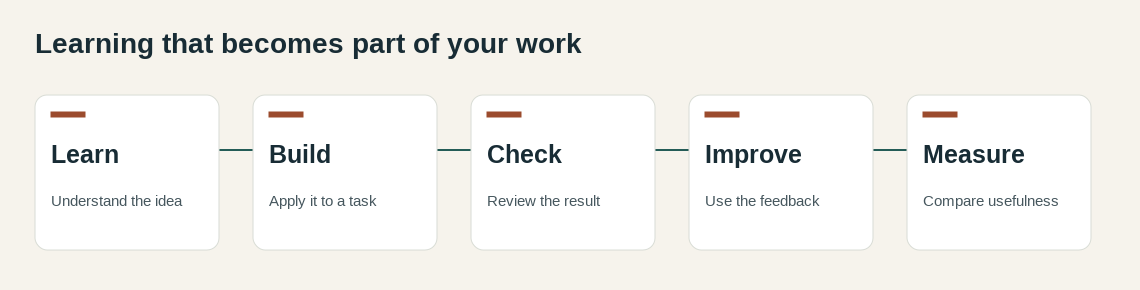
We teach AI through the work people need to do. You learn an idea, see it applied, build something and improve it through review.
Professional knowledge belongs in the build. A technically impressive output may still miss the purpose of a report, the logic of a proposal or the evidence a decision requires. You practice choosing suitable tasks, providing context, checking sources and deciding when a person must step in.
- 01
Learn
Each session starts with one idea, such as giving AI context or checking an answer. We explain it in plain words, with an example from real work.
- 02
Build
You use the idea right away on a real task from your job. You build in the session, with help close by.
- 03
Check
You check facts, sources and numbers. Peers and a trainer look at what you built and say what works and what does not.
- 04
Improve
You use the feedback to change your build and test it again. A second try is where much of the learning happens.
- 05
Measure
You compare the result with how you worked before, including the time spent checking and correcting. Then you decide what to keep or adjust.
Three habits in every build
Check outputs
Check facts, sources, calculations and whether the result suits the people who will rely on it. AI can be wrong and still sound convincing.
Protect information
Use approved tools and suitable data. Instructions describe the behavior you want; the actual permissions in a tool control what it can access and do.
Measure usefulness
A build is only useful if it helps. Compare it with how you worked before, including the time spent checking and correcting.
Fictional teaching example
The notes
- Reporting template drafted.
- Finance has not reviewed it yet.
- Friday is proposed as the sending date, pending approval from the program lead.
The AI draft
"The reporting template has been approved, and we will send it on Friday."
What the reviewer caught
- "Approved" is not supported: finance has not reviewed the template.
- "We will send it on Friday" is not supported: Friday is only proposed and awaits approval.
Improved wording
"The reporting template is drafted and awaits finance review. Friday is the proposed sending date, pending approval from the program lead."
From chat to system: a learning journey
- 1
Chat
You ask, it answers, and you often explain the context again.
- 2
Context
AI knows your role, your standards and your work.
- 3
Assistant
A saved helper set up with your instructions. You still check what it gives you.
- 4
Workflow
A recurring process, step by step, with AI doing the steps.
- 5
Connected tools
AI reads from and writes to the tools you already use.
- 6
Agent
AI works toward a goal while you supervise.
- 7
System
All of it working together, checked, safe and measured.
Get in touch: hi@esfer.org